


If you are managing an SEO strategy, you probably have a massive spreadsheet filled with thousands of keywords exported from tools like Ahrefs or Semrush. But having data isn’t a strategy. To turn those raw search volumes into actual organic traffic, you need a system to organize them.
That is exactly where a SEO keyword map comes in. In this guide, we will show you how to structure your target queries, prevent content overlap, and provide you with a 100% free keyword mapping template to start organizing your website architecture today.
What is a SEO Keyword Map?
A keyword map is a strategic framework that assigns specific search queries to the exact URLs (or planned content) on your website. It acts as the bridge between your raw keyword research and your content calendar, ensuring that every page serves a unique purpose and targets a specific search intent.
Keyword Mapping Tool vs. Keyword Planner
Many beginners confuse these two concepts. While a keyword planner (like Google’s own tool) is used during the discovery phase to find new search terms and check search volumes, a keyword mapping tool is used for execution. You use a planner to find the words, but you use a map to assign them to your content silos and track your ranking progress.
Why You Need a Keyword Mapping Strategy
Throwing content at the wall to see what sticks is a recipe for disaster. Building a proper keyword map provides three massive benefits:
- Prevents Keyword Cannibalization: It ensures you don’t accidentally create three different blog posts targeting the exact same query, which confuses Google and hurts your rankings.
- Organizes Topical Silos: It helps you visualize your site architecture, making it easier to build internal links between your pillar pages and supporting cluster content.
- Identifies Content Gaps: By mapping your existing URLs to your target keywords, you instantly see which high-volume queries you are missing.
How to Build a Keyword Mapping Template (Step-by-Step)
Ready to organize your strategy? Follow these four steps to build a bulletproof SEO content map.
Step 1: Gather Your Data (Search Volume & KD)
Start by exporting your keyword research into a CSV file. Make sure your data includes the most important metrics: Monthly Search Volume and Keyword Difficulty (KD). This will help you prioritize which pages to build first based on your website’s current domain authority.

Step 2: Define the Search Intent
This is the most crucial step. What are the 4 types of keywords? Every query must be tagged with one of these intents:
- Informational: The user wants to learn something (e.g., “how to build a keyword map”).
- Navigational: The user is looking for a specific website.
- Commercial: The user is comparing options before buying.
- Transactional: The user is ready to purchase (e.g., “buy SEO templates”).

Step 3: Group into Topical Clusters
Don’t treat keywords in isolation. Group related terms into semantic clusters. For example, “SEO keyword map”, “keyword mapping tool”, and “keyword map template” should all belong to the same topical cluster and point to the same target URL.

Step 4: Map Queries to Target URLs
Finally, assign your primary keyword and secondary LSI keywords to a specific URL (either an existing page or a draft in your content planner).
The Best Keyword Map Templates and Formats
There are several ways to build your database, depending on the software you prefer.
Google Sheets & Excel Keyword Mapping Templates
The traditional method is using a Google Sheets or Excel keyword map template. While this is a common starting point and easy to set up, it has major drawbacks. Spreadsheets easily become messy, cells get accidentally deleted, and it’s incredibly difficult to link a static row in Excel to your actual content writing workflow.
The Modern Way: Using a Notion Keyword Database
If you want to treat SEO like a professional, the best format is a relational database. By using a Notion keyword mapping template, you can visually filter by search intent, use Kanban boards to track content status, and seamlessly link your mapped keywords directly to your content briefs.
Advanced Keyword Mapping Examples
Content Keyword Map for YouTube
Keyword mapping isn’t just for blogs. You can use a content keyword map for YouTube as well. By organizing your video ideas based on YouTube search volumes and mapping them to specific video formats (tutorials, reviews, vlogs), you can build topical authority on your channel and dominate the algorithm.

Keyword Mapping Template Free Download
Stop wrestling with messy spreadsheets. I’ve built the ultimate Notion Keyword Map Template, and you can download the full, unrestricted version completely for free.
Transform your keyword research into an action plan
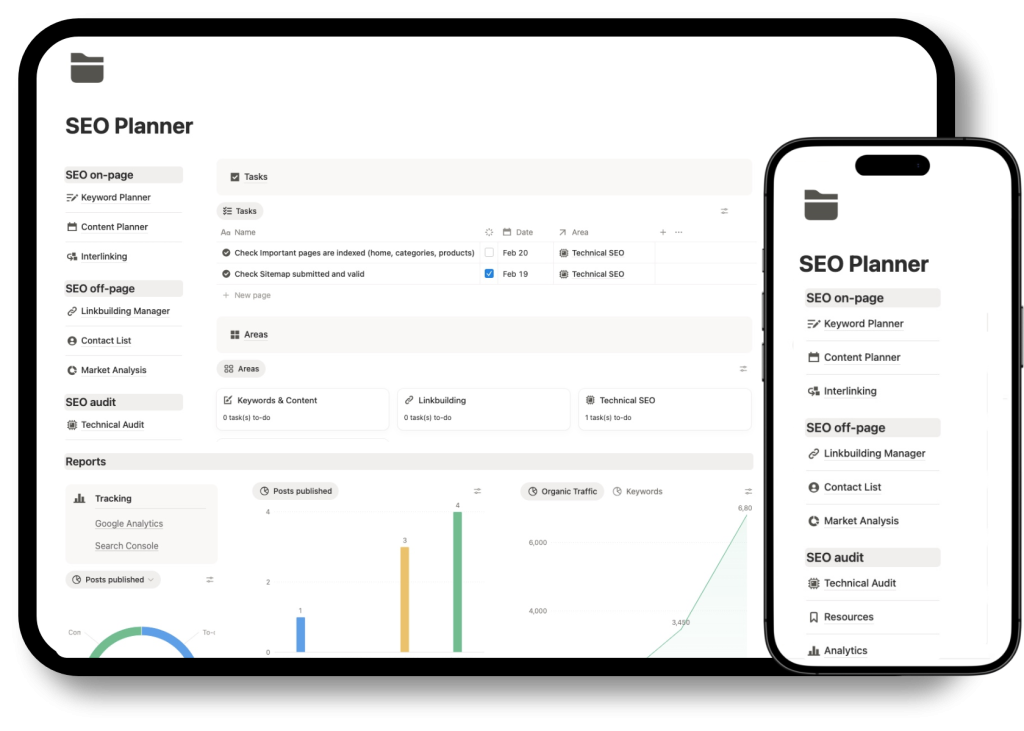
Once you have your keywords mapped, you need to execute the content. The free keyword map is actually a core module of the Notion SEO Project Management Template. For just $19, you get the complete system: the keyword map, a fully integrated content planner, a backlink CRM, and technical SEO audit dashboards.
Frequently Asked Questions (FAQ)
Can I use ChatGPT for keyword research?
You can use ChatGPT to brainstorm seed topics and generate ideas for topical clusters. However, AI language models cannot provide accurate, real-time search volume or keyword difficulty metrics. You should always validate AI suggestions with a dedicated SEO tool.
How to export a keyword map from Google Analytics?
This is a common misconception. You cannot export a keyword map from Google Analytics 4 (GA4), as it tracks user behavior, not the exact search queries. To find the keywords your site is already ranking for, you need to export your performance data from Google Search Console.
Is Google’s Keyword Planner free?
Yes, Google Keyword Planner is a free tool provided within the Google Ads ecosystem. However, if you are not actively spending money on ad campaigns, Google will only show you broad search volume ranges (e.g., 10K – 100K) instead of precise numbers.

