
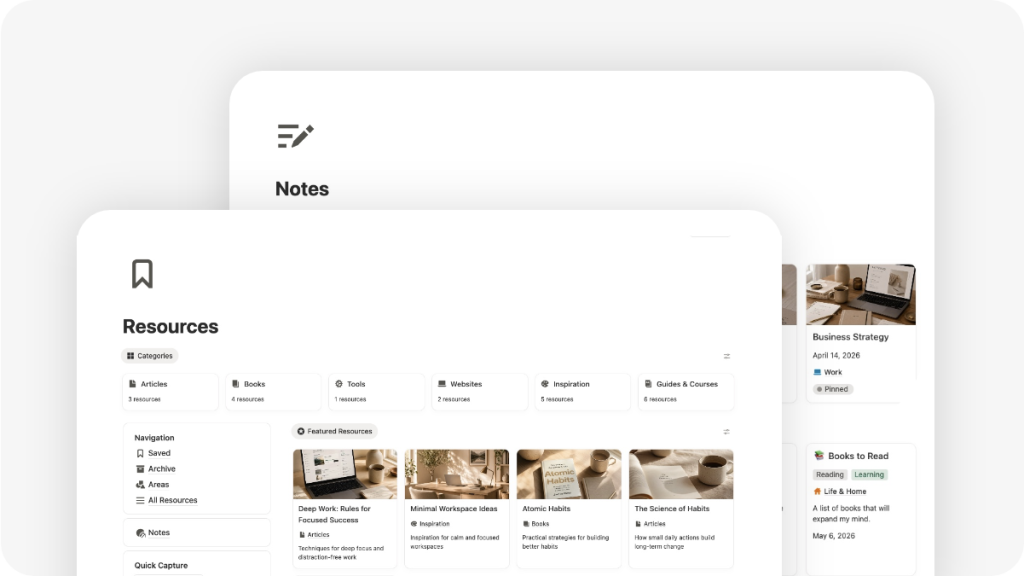

Most people do not need more productivity apps. They need one trusted place where their thoughts, notes, ideas, plans, resources, projects, and personal information can finally live together.
That is the real purpose of a personal second brain.
A second brain is not just a notes app. It is not just a folder full of saved links. And it is not a complicated productivity system that takes more time to maintain than it saves.
A good second brain helps you capture what matters, organize it clearly, and use it when you need it.
Notion is one of the best tools for building this kind of personal system because it lets you combine notes, databases, dashboards, tasks, projects, goals, resources, and life areas inside one flexible workspace.
This guide will show you how to build a personal second brain in Notion in a practical, simple, and sustainable way.
What Is a Second Brain?
A second brain is a personal knowledge system that helps you store and organize the information you do not want to keep only in your head.
That can include:
- Ideas
- Notes
- Articles
- Book highlights
- Useful links
- Personal reflections
- Courses
- Tools
- Projects
- Goals
- Tasks
- References
- Decisions
- Plans
The goal is not to save everything. The goal is to create a reliable place for the things that are useful, meaningful, or actionable.
A personal second brain should help you answer questions like:
“What did I save about this topic?”
“What idea did I have last week?”
“What resources can help me with this project?”
“What goals am I working toward?”
“What tasks are connected to this area of my life?”
“Where do I keep useful things I want to return to later?”
When your second brain works well, it reduces mental clutter. You no longer need to remember everything manually because your system holds the information for you.
Why Build Your Second Brain in Notion?
Notion works well for a second brain because it is flexible enough to organize both information and action.
Many tools are good for storing notes. Others are good for managing tasks. Others are useful for tracking projects. But a personal second brain becomes much more powerful when all of those pieces are connected.
In Notion, you can create a system where:
- Notes store your thoughts and ideas.
- Resources store useful things you want to keep.
- Areas organize different parts of your life.
- Projects turn ideas into outcomes.
- Tasks turn projects into action.
- Goals give direction to your system.
- Dashboards help you see what matters now.
This is where Notion becomes more than a notes app. It becomes a personal operating system.
The Biggest Mistake: Making Your Second Brain Too Complicated
Many people try to build a second brain and immediately make it too complex.
They create too many databases, too many tags, too many views, and too many rules. After a few days, the system becomes difficult to maintain. Instead of helping them think clearly, it becomes another thing to manage.
A better approach is to start with a simple structure.
You do not need a perfect knowledge management system from day one. You need a system you can actually use every day.
A personal second brain should be:
Easy to capture into.
You should be able to add an idea, note, task, or resource quickly.
Easy to navigate.
You should know where to find things without overthinking.
Easy to maintain.
The system should not require constant cleanup.
Connected to real life.
Your notes should not sit in isolation. They should support your goals, projects, tasks, routines, and decisions.
The best second brain is not the most complex one. It is the one you trust enough to keep using.
Notion Second Brain Core Structure
A practical Notion second brain can be built around six core layers:
- Dashboard
- Quick Capture
- Notes
- Resources
- Areas
- Goals, Projects, and Tasks
Each layer has a specific purpose.
1. Start with a Main Dashboard
Your dashboard is the home base of your second brain.
It should give you quick access to the most important parts of your system without overwhelming you.
A good personal dashboard can include:
- Quick Capture
- Today’s tasks
- Active projects
- Goals
- Notes
- Resources
- Areas
- Habit tracker
- Calendar-style views
- Important life modules
The dashboard should answer one simple question:
“Where do I go to manage my life today?”
Avoid turning your dashboard into a decorative page with too many widgets. A beautiful dashboard is helpful, but clarity matters more than decoration.
Your second brain should feel calm, organized, and useful.
2. Add a Quick Capture System
Quick Capture is one of the most important parts of a second brain.
Without Quick Capture, ideas get lost. Tasks stay in your head. Interesting links disappear. Notes end up scattered across apps, messages, bookmarks, and random documents.
Quick Capture gives you a fast way to save anything before deciding exactly where it belongs.
You can use Quick Capture for:
- Random ideas
- Tasks
- Notes
- Links
- Questions
- Book recommendations
- Personal reminders
- Project thoughts
- Things to review later
The key is speed. Capture first, organize later.
In Notion, you can create a simple Quick Capture database or section on your dashboard. Then, during a daily or weekly review, you can move each item into the right place.
Some items may become tasks.
Some may become notes.
Some may become resources.
Some may belong to a project.
Some may not be worth keeping.
That is normal. Quick Capture is not meant to be perfectly organized. It is meant to prevent useful thoughts from disappearing.
3. Create a Notes Database
Your Notes database is where you store your own thoughts.
This is an important distinction.
Notes are not just things you found online. Notes are things you think, write, summarize, reflect on, or create.
Your Notes database can include:
- Personal reflections
- Ideas
- Meeting notes
- Learning notes
- Journal-style entries
- Book notes
- Course notes
- Project notes
- Decision notes
- Drafts
- Observations
A useful note should usually include some context. Instead of saving disconnected fragments, try to write notes in a way that your future self will understand.
For example, instead of writing:
“Improve routine”
Write:
“I want to improve my morning routine because I keep starting the day reactively. Possible changes: prepare the night before, check tasks after breakfast, avoid phone for first 30 minutes.”
That note is much more useful because it explains the problem, the context, and the possible next step.
Your Notes database should feel like a thinking space.
4. Create a Resources Database
Resources are different from notes.
A Note is usually something you write.
A Resource is usually something useful you save.
Your Resources database can include:
- Articles
- Tools
- Websites
- Videos
- Courses
- Guides
- Templates
- Newsletters
- References
- Inspiration
- Useful links
- Documents
- Research materials
Think of Resources as:
A place where you store useful things for your life.
This distinction keeps your second brain cleaner.
If you mix notes and resources together, your system can become messy. Your own thinking gets mixed with external material, and it becomes harder to know what each item is for.
A simple Resource database might include properties like:
- Name
- Type
- URL
- Topic
- Area
- Status
- Related project
- Notes
Resource types could include:
- Article
- Book
- Video
- Course
- Tool
- Guide
- Inspiration
- Reference
- Template
The goal is not to save every link you find. The goal is to save resources that are useful enough to return to.
5. Organize Your Life with Areas
Areas help you organize your second brain by life context.
An Area is an ongoing part of your life that requires attention but does not have a fixed end date.
Examples of areas include:
- Health
- Finance
- Work
- Home
- Learning
- Personal growth
- Relationships
- Travel
- Creativity
- Wellness
Areas are useful because not everything in life is a project.
A project has an outcome and an end point.
An area is ongoing.
For example:
“Run a half marathon” is a project.
“Health” is an area.
“Save for a trip to New York” is a project.
“Finance” is an area.
“Complete a course” is a project.
“Learning” is an area.
When you connect Notes, Resources, Projects, and Tasks to Areas, your second brain becomes easier to navigate.
You can open your Health area and see related habits, notes, resources, projects, and tasks. You can open your Finance area and find expenses, subscriptions, goals, and money-related notes. You can open your Learning area and find courses, articles, books, and study notes.
Areas give your second brain structure without making it too rigid.
6. Connect Goals, Projects, and Tasks
A second brain should not only store information. It should help you act on it.
That is why Goals, Projects, and Tasks are essential.
A simple structure looks like this:
Goals define the outcome.
Projects create the plan.
Tasks create the next actions.
For example:
Goal: Improve my health
Project: Build a consistent running routine
Tasks:
- Choose weekly running days
- Plan first 4 runs
- Track first run
- Review progress after two weeks
This structure helps you move from intention to execution.
Without this connection, your second brain can become a storage system that never leads to action.
The goal is to make your knowledge useful.
A note can inspire a project.
A resource can support a goal.
A project can generate tasks.
A task can appear in your daily planner.
A habit can support an area of your life.
This is where a Notion second brain becomes powerful: information and action live in the same system.
Simple Notion Second Brain Workflow
Once your structure is in place, you need a workflow.
A second brain works best when you use it consistently, not perfectly.
Here is a practical workflow you can follow.
Step 1: Capture Everything Quickly
When something important comes up, capture it.
Do not worry about organizing it immediately.
Capture:
- Ideas
- Tasks
- Links
- Notes
- Thoughts
- Questions
- Recommendations
- Things to review
Your only job at this stage is to get it out of your head and into Notion.
Step 2: Clarify What Each Item Is
During your review, look at your captured items and decide what they are.
Ask:
Is this a task?
Is this a note?
Is this a resource?
Is this related to a project?
Is this connected to a goal?
Is this part of an area?
Is this worth keeping?
This step prevents your system from becoming a dumping ground.
Not everything you capture deserves a permanent place.
Step 3: Connect Items to the Right Place
Once you clarify each item, connect it.
Examples:
- A saved article becomes a Resource.
- A personal thought becomes a Note.
- A next action becomes a Task.
- A bigger outcome becomes a Project.
- A long-term intention becomes a Goal.
- A life category becomes an Area.
This makes your second brain searchable, organized, and useful.
Step 4: Review Your System Weekly
A second brain needs light maintenance.
A weekly review helps you keep the system alive.
During your weekly review, check:
- Open tasks
- Active projects
- Current goals
- New notes
- Saved resources
- Quick Capture inbox
- Habits and routines
- Upcoming dates
- Areas that need attention
You do not need to review everything deeply every week. The goal is simply to reconnect with your system and make sure nothing important is buried.
Step 5: Use Your Second Brain to Plan Your Days
Your second brain becomes much more valuable when it supports your daily planning.
Every day, you should be able to open Notion and see:
- What matters today
- What tasks are due
- What projects are active
- What habits you are tracking
- What notes or resources are relevant
- What needs your attention
This turns your second brain from a passive storage system into an active life planning system.
Notes vs Resources: The Key Difference
One of the easiest ways to keep your Notion second brain clean is to separate Notes from Resources.
Use Notes for your own thinking.
Examples:
- “Ideas for improving my weekly routine”
- “Reflection after finishing a book”
- “Thoughts about changing my workout schedule”
- “Personal goals for the next quarter”
- “Notes from a meeting”
Use Resources for useful things you collect.
Examples:
- An article about productivity
- A video about personal finance
- A course you want to complete
- A tool you might use
- A travel guide
- A recipe website
- A book recommendation
This distinction makes your system easier to search and maintain.
Your Notes database becomes your thinking space.
Your Resources database becomes your reference library.
Together, they create the knowledge layer of your second brain.
Example: How a Personal Second Brain Works in Real Life
Imagine you want to improve your health.
You capture a quick thought:
“I want to build a more consistent fitness routine.”
During your review, you turn that thought into a Goal:
Goal: Improve my health and energy.
Then you create a Project:
Project: Build a weekly workout routine.
Then you create Tasks:
- Choose workout days
- Create first weekly workout plan
- Track first workout
- Review routine after two weeks
You also save Resources:
- A beginner workout video
- A running guide
- A meal planning article
You create Notes:
- “Why I want to improve my energy”
- “What has stopped me from staying consistent before”
- “Workout routine ideas”
You connect everything to the Health area.
Now your second brain is not just storing information. It is helping you move toward a real outcome.
That is the point.
A Personal Second Brain Should Support Your Life, Not Just Your Notes
Many second brain systems focus only on knowledge management.
But your personal life is bigger than notes.
A useful second brain can also support:
- Daily planning
- Weekly planning
- Monthly planning
- Habits
- Goals
- Projects
- Tasks
- Finances
- Wellness
- Travel
- Reading
- Watchlists
- Personal routines
- Life admin
This is why building your second brain inside a larger life planning system can be so effective.
Your ideas, tasks, routines, projects, and personal information are not separated across different apps. They live together in one connected workspace.
You can plan your day, review your goals, save useful resources, track habits, organize projects, and manage personal life areas from the same place.
That is when Notion starts to feel like a true personal operating system.
The Ideal Second Brain Setup for Beginners
If you are just starting, do not build a complex system immediately.
Start with this simple setup:
- A main dashboard
- A Quick Capture section
- A Notes database
- A Resources database
- An Areas database
- A Projects database
- A Tasks database
- A simple weekly review
That is enough.
Once you use the system consistently, you can add:
- Goals
- Habits
- Finance tracking
- Reading list
- Travel planning
- Wellness planning
- Personal modules
- Advanced views
The best approach is progressive.
Start simple. Add depth when you need it.
Build or Use a Notion Second Brain Template?
You can build your own second brain from scratch, and doing so can help you understand your system better.
But building from scratch also takes time.
You need to decide:
- Which databases to create
- Which properties to use
- How to connect notes, resources, tasks, projects, goals, and areas
- How to design the dashboard
- How to create useful views
- How to keep the system simple
- How to make it pleasant enough to use daily
A good Notion second brain template gives you the structure upfront, so you can start organizing your life instead of spending weeks building the system.
The best template should not feel like a complicated productivity machine. It should feel like a calm home base for your personal life.
Want a Ready-Made Notion Second Brain for Your Personal Life?
If you want to skip the setup process, you can use a complete Notion Planner designed to bring your notes, resources, goals, projects, tasks, habits, wellness, finances, and personal life into one connected dashboard.
It gives you a calm place to plan your days, store useful resources, organize personal knowledge, manage projects, track habits, and keep the important parts of your life together in Notion.
Instead of building a second brain from scratch, you can start with a ready-made personal system and customize it as your life grows. Get mine here.

