

Turn your keyword research into a clear page strategy. Use this free keyword mapping template to group related queries, assign each cluster to a target URL, identify content gaps and plan what to create or optimize next.

If you are managing an SEO strategy, you probably have a massive spreadsheet filled with thousands of keywords exported from tools like Ahrefs or Semrush. But having data isn’t a strategy. To turn those raw search volumes into actual organic traffic, you need a system to organize them.
That is exactly where a SEO keyword map comes in. In this guide, we will show you how to structure your target queries, prevent content overlap, and provide you with a 100% free keyword mapping template to start organizing your website architecture today.
What is a SEO Keyword Map?
Keyword mapping is the process of grouping related search queries around the same search intent and assigning each cluster to the page that should satisfy it.
Instead of treating every keyword as a separate content idea, a keyword map defines page ownership: which existing or planned URL should rank for each meaningful search intent.
This makes keyword mapping the bridge between keyword research and site architecture.
Keyword research finds search opportunities. Keyword mapping decides where those opportunities belong.
One page can therefore target multiple related queries when they share the same intent. The goal is not to create one page for every keyword, but to give each relevant search intent a clear home on your site.
What Should a Keyword Mapping Template Include?
A useful keyword map should contain enough information to make a page-level SEO decision — not just store a list of keywords.
The free template helps you organize:
- Keyword / query — the search term you are evaluating
- Topic cluster — the broader group the query belongs to
- Search intent — what the searcher is trying to accomplish
- Search volume — estimated monthly demand
- Keyword difficulty — an indication of ranking competition
- Priority — which opportunities should be addressed first
- Target URL / related page — the page that should own the query
- Status — whether the page is planned, being worked on, or published.

SEO Keyword Mapping Example
A finished keyword map should make it possible to look at a cluster and immediately understand what page should own it and what action comes next.
Here is a simplified example:
| Cluster | Primary query | Supporting queries | Intent | Target page | Action |
|---|---|---|---|---|---|
| Keyword mapping | keyword mapping template | SEO keyword mapping template, keyword map template, keyword mapping example | Informational | /blog/keyword-mapping-template/ | Optimize |
| Keyword research | keyword research template | keyword research Notion template, SEO keyword research template | Informational | Keyword Research Template | Optimize |
| Keyword mapping software | keyword mapping tool | SEO keyword mapping tool, keyword mapping generator | Commercial | SEO Map | In progress |
Notice that several related keywords can map to the same URL. What matters is whether one page can fully satisfy the underlying intent.
On the other hand, a query such as “keyword mapping tool” may deserve a different page from “keyword mapping template” because the searcher is looking for software rather than a downloadable framework.
This distinction is what prevents a keyword map from turning into a list of loosely related keywords.
How to Create a Keyword Map Step by Step
Ready to organize your strategy? Follow these four steps to build a bulletproof SEO content map.
Step 1: Gather Your Keywords and Existing URLs
Start with your keyword research and an inventory of the pages already on your website.
Your keyword data may come from Google Search Console, Google Keyword Planner, Ahrefs, Semrush, or another research tool. Useful metrics include search volume, difficulty, current position and the URL that already receives impressions.
For an existing website, do not start from a blank sheet. A page that Google already associates with a query may be a better candidate to optimize than replacing it with a new URL.
Step 2: Group Keywords by Shared Search Intent
Next, cluster queries that can realistically be satisfied by the same page.
Do not group keywords simply because they are semantically related.
Two terms belong in the same cluster when the same page can satisfy the intent behind both searches. If the search results suggest different needs, page types or stages of the buying journey, they may require separate URLs.

For example, keyword mapping template and SEO keyword mapping template can reasonably belong together. keyword mapping tool, however, introduces a stronger software intent and may deserve a separate commercial page.
What are the 4 types of keywords? Every query must be tagged with one of these intents:
- Informational: The user wants to learn something (e.g., “how to build a keyword map”).
- Navigational: The user is looking for a specific website.
- Commercial: The user is comparing options before buying.
- Transactional: The user is ready to purchase (e.g., “buy SEO templates”).

Step 3: Choose a Primary Query for Each Cluster
Once the cluster is clear, choose the query that best represents its main topic and intent.
The primary keyword acts as the label for the page. Supporting queries expand the coverage of that page; they are not automatically separate content ideas.
There is no fixed number of keywords that should map to one page. A page can rank for many variations as long as they belong to the same underlying intent.
Step 4: Map Queries to Target URLs
For each cluster, decide which URL should own it.
Sometimes the correct page already exists. Sometimes an existing page should be expanded or repositioned. And sometimes the search intent is not covered anywhere on the site and a new page is justified.
The mapping decision should therefore answer:
Which page should rank for this intent?
Step 5: Define the SEO Action
Mapping a cluster to a URL is not enough. Give every mapped page an action:
- Keep — the right page already exists and adequately covers the intent.
- Optimize — the correct URL exists but needs stronger coverage or positioning.
- Create — there is meaningful demand that no existing page satisfies.
- Merge — multiple pages are competing for essentially the same intent.
- Retarget — an existing page should focus on a different intent.
Step 6: Add Priority and Internal Links
Finally, turn the map into an execution plan.
Prioritize pages using a combination of search opportunity, business relevance, ranking difficulty and your existing authority.
Then define the internal links that connect related pages inside each topic cluster. Keyword mapping should not end with isolated URLs: those pages need to fit into the wider site architecture.
How to Map Keywords for an Existing Website
Keyword mapping is especially useful when your website already has pages receiving organic impressions.
Before creating anything new, open the Performance report in Google Search Console and look at the queries and pages Google already associates with your site.
For each relevant cluster:
- Identify the URL already receiving impressions.
- Check whether that URL genuinely satisfies the search intent.
- Keep or optimize it if it is already the correct page.
- Look for another URL competing for the same intent.
- Consolidate overlapping pages when necessary.
- Create a new page only when the existing site does not properly cover the opportunity.
This prevents keyword research from becoming an automatic list of new articles and helps you preserve ranking signals your existing pages have already earned.
How Keyword Mapping Helps Prevent Cannibalization
Keyword cannibalization is not simply having two pages that mention similar keywords.
The real problem appears when multiple URLs compete to satisfy essentially the same search intent and there is no clear page that should own it.
A keyword map makes this overlap visible.
When you find competing pages, decide which URL should be the primary owner. You can then merge overlapping content, reposition one page toward a different intent, redirect obsolete URLs where appropriate, and update your internal links so they reinforce the page you want to rank.
The result is a clearer architecture for users and search engines.
Notion vs Google Sheets vs Excel for Keyword Mapping
There is no single best format for every workflow.
Google Sheets is convenient for quick collaboration, filtering large exports and sharing a map with a team.
Excel works well for offline analysis and larger datasets.
Notion becomes particularly useful when keyword mapping is connected to an ongoing content workflow. A relational database can connect clusters with content, status, priority and other parts of your SEO process instead of leaving the map as a static spreadsheet.
The best format is the one that lets you keep the map updated and actually use it when making content decisions.
Keyword Mapping Template vs. Keyword Mapping Tool
A template is enough when you want to organize the mapping decisions yourself.
But as a site grows, storing the information is usually not the difficult part. The harder questions are:
Which topics are actually relevant to the business?
How should they be grouped into clusters?
Which pages should exist?
How should those pages connect?
What should be built first?
That is where a keyword mapping tool can go beyond a spreadsheet.
Go Beyond Keyword Mapping with SEO Map
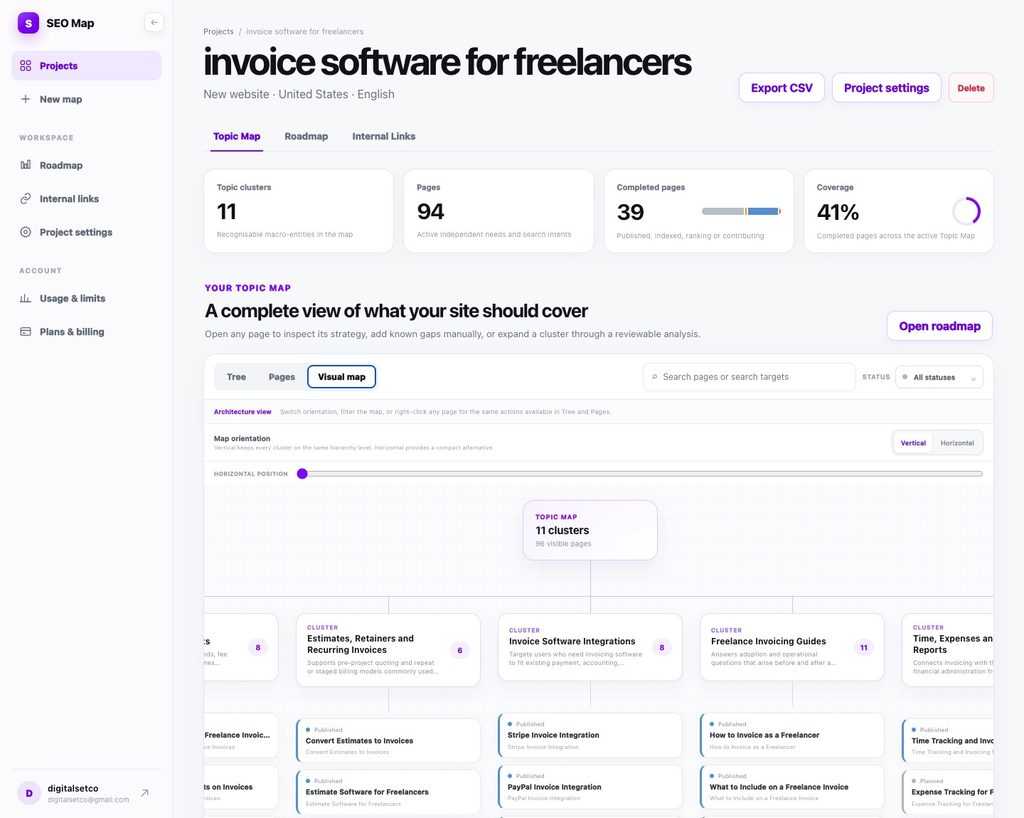
SEO Map turns your project context into a complete SEO site strategy.
Instead of starting with an empty spreadsheet, you can describe your business, audience and market and build a structured topic map with the pages to create, keyword targets, internal links and a prioritized roadmap.
The keyword map becomes part of a wider site architecture rather than an isolated list of queries.
Frequently Asked Questions (FAQ)
Can I use ChatGPT for keyword research?
You can use ChatGPT to brainstorm seed topics and generate ideas for topical clusters. However, AI language models cannot provide accurate, real-time search volume or keyword difficulty metrics. You should always validate AI suggestions with a dedicated SEO tool.
How to export a keyword map from Google Analytics?
This is a common misconception. You cannot export a keyword map from Google Analytics 4 (GA4), as it tracks user behavior, not the exact search queries. To find the keywords your site is already ranking for, you need to export your performance data from Google Search Console.
What is the difference between keyword research and keyword mapping?
Keyword research identifies what your audience searches for. Keyword mapping takes those opportunities and decides which page on your website should target each relevant cluster.
Start Mapping Your Keywords
Keyword research becomes much more useful once every relevant cluster has a clear destination.
Use the free template to organize your keywords, map them to the right pages and turn your research into an SEO plan you can actually execute.


