


If you run a small Etsy shop with only a few products, organizing listings can feel manageable.
You can keep most of it in your head. You know which items are live, which drafts still need work, and which listings you want to update next.
That stops working once your catalog grows.
At that point, most Etsy sellers do not have a listing creation problem. They have a listing management problem.
They have drafts with no launch priority. Active listings with no clear keyword target. Product variations that are hard to track. Listings that need better photos, better tags, or better titles, but no system showing what needs attention first.
That is why organizing Etsy listings is not just about putting products into shop sections.
It is about building a system that helps you manage each listing as an operational asset and a search asset.
In this guide, you will learn how to organize Etsy listings by status, product, and keyword, how to avoid the most common listing management mistakes, and how to create a repeatable workflow that keeps your shop easier to manage as it grows.
The difference between organizing products and managing listings
A product and a listing are related, but they are not the same thing.
A product is what you sell.
A listing is how that product is presented, targeted, and optimized inside Etsy.
That distinction matters.
You may have one product with one listing.
You may also have one product family that generates multiple listing angles over time.
If you only organize products, you miss the SEO and workflow side of the business.
If you only organize listings, you lose connection with the actual catalog.
A strong Etsy system needs both.

How to organize Etsy listings by status, product, and keyword
If you want a practical system, organize listings around three core dimensions:
- status
- product
- keyword
That combination gives you control over operations and search strategy at the same time.
Track listing status from draft to active
Every listing should have a visible status.
A simple structure could look like this:
- Idea
- Draft
- Ready for publish
- Active
- Needs optimization
- Refresh / update
- Retired

This solves a common problem immediately: not knowing where each listing stands.
Instead of treating listings as a flat list, you can see what is being built, what is live, and what needs work.
That alone reduces friction.
Connect every listing to a specific product
Each listing should be linked to a product record.
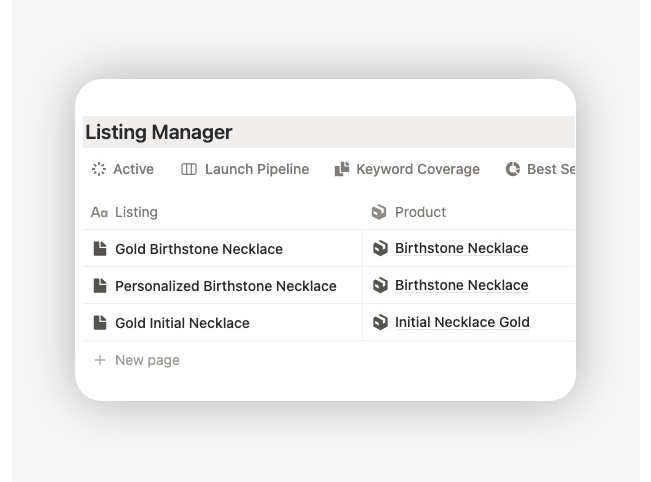
This matters because listings often become disconnected from the underlying catalog. Sellers create listing drafts, change titles, duplicate ideas, or update pricing without a clean product reference.
When the listing is linked to a product, you can keep control over:
- product name
- SKU
- category
- materials
- variants
- base pricing
- stock context

That helps prevent duplicate work and keeps the listing grounded in the actual product you are selling.
Assign one primary keyword to each listing
This is where most listing organization systems become much stronger.
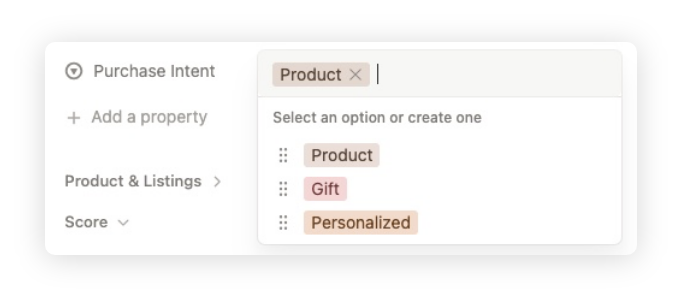
Each listing should have one main keyword or one primary search intent.
That does not mean the listing only targets one phrase. It means the listing needs one clear center of gravity.
For example:
- Product: Gold Birthstone Necklace
- Main keyword: birthstone necklace

Once that is clear, the rest of the listing becomes easier to structure:
- title direction
- tags
- attributes
- supporting phrasing
- positioning
It also reduces the risk of creating multiple listings that all chase the same search intent without a clear reason.
Separate published listings from listings that still need work
One of the biggest sources of Etsy listing chaos is mixing everything together.
Drafts, active listings, and incomplete ideas often sit in the same place with no distinction.
That makes it harder to answer basic questions such as:
- What is ready to launch?
- What is live but weak?
- What is still waiting for assets?
- Which listings are just ideas, not real priorities?
A better system separates them clearly.
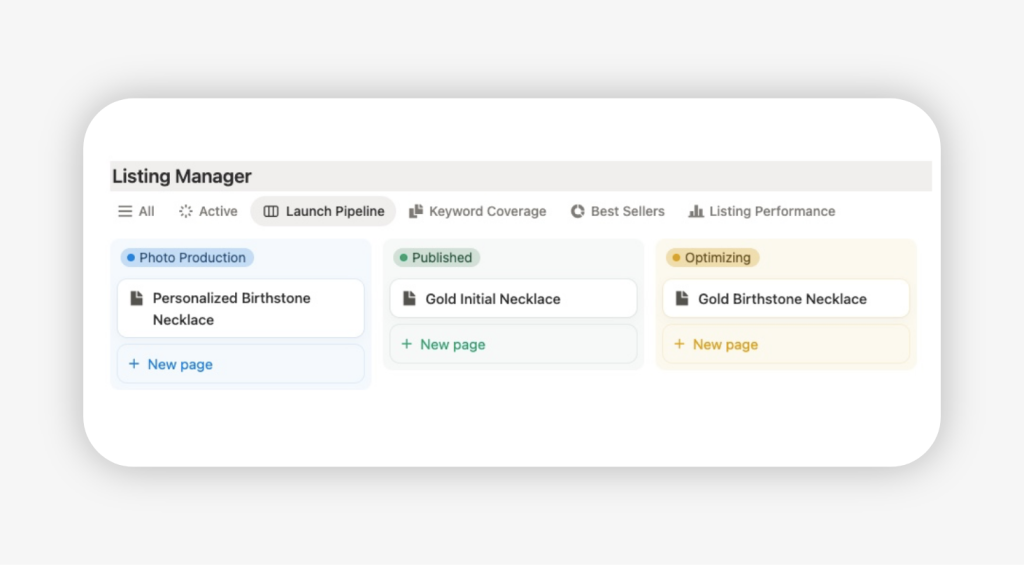
For example, you should be able to filter:
- all active listings
- all listings missing a keyword
- all drafts waiting for photos
- all listings needing optimization
- all listings due for review this month
That is what real listing organization looks like.
What to track in an Etsy listing management system
A listing management system should not be complicated, but it does need the right fields.
The goal is to track enough information to manage and improve listings without building an overengineered database.
Core fields: title, product, keyword, and status
These are the minimum fields worth tracking for every listing:
- Listing title
- Linked product
- Main keyword
- Status
- Category
- Price
- Publish date
- Next action
These fields give you the basic structure to manage listing production and maintenance.
Listing assets: photos, video, pricing, and description
A listing is not ready just because the title exists.
You also need visibility into the supporting assets:
- number of product photos
- whether video is included
- description complete or incomplete
- personalization fields ready or not
- pricing confirmed
- shipping and processing details reviewed
This helps avoid publishing half-finished listings and makes your workflow more reliable.
Optimization fields: tags, attributes, categories, and notes
If you want listings to perform, you need fields that support optimization, not just publication.
Useful examples include:
- tags drafted
- attributes complete
- category confirmed
- title reviewed
- optimization notes
- title angle or positioning angle
- priority level
This makes it much easier to see what kind of work a listing needs.
Review fields: performance signals and next action
A listing organization system should not stop at launch.
You also need a simple review layer.
Helpful fields include:
- favorites
- conversion rate
- sales
- search impressions
- last review date
- next optimization action
You do not need to build a full analytics platform into your listing tracker, but you do need enough signal to know whether a listing needs attention.
A simple Etsy listing workflow for growing shops
The easiest way to stay organized is to follow the same process every time.
Here is a practical workflow that works well for growing Etsy shops.
Step 1: Start with the product
Before creating the listing, make sure the product itself is clear.
That means defining:
- what the product is
- what category it belongs to
- what makes it relevant to the buyer
- any variants or personalization options
- base pricing and key details
This is important because weak listing organization often starts upstream. Sellers begin writing listings before the product is properly defined.
That leads to inconsistent titles, unclear positioning, and poor workflow control.
Step 2: Build the listing around one search intent
Once the product is defined, assign the listing one main keyword or one main search intent.
Then build the listing around that.
A simple logic could look like this:
- product
- main keyword
- title direction
- tags
- category
- attributes
- description angle
- media requirements
This makes the listing easier to write and easier to review later.
It also forces discipline. Instead of improvising the listing inside Etsy, you are creating it with a clear target.
Step 3: Publish only when the listing is complete
A lot of Etsy sellers treat “publish” as the start of the work.
In reality, publish should happen after the listing is operationally ready.
That means the listing should have:
- a finished title
- complete core tags
- category and attributes set
- complete photos
- pricing confirmed
- description complete
- any personalization or variation details checked
This reduces messy launches and makes your active listing portfolio much cleaner.
Step 4: Review active listings on a regular schedule
Publishing is not the end of listing organization.
If a listing is live, it still needs maintenance.
A simple review cadence might include:
- weekly check for newly published listings
- monthly review of underperforming listings
- seasonal review of time-sensitive listings
- refresh cycle for older listings that need better assets or stronger targeting
The point is not to touch everything constantly.
The point is to stop listings from disappearing into a black hole after launch.
Common Etsy listing organization mistakes
Most sellers do not struggle because they lack effort. They struggle because their system is weak.
These are some of the most common mistakes.
Too many drafts with no launch priority
Draft accumulation is one of the clearest signs of poor listing organization.
Sellers keep creating ideas, partial titles, draft listings, and product concepts without a clear way to prioritize them.
The result is mental clutter and stalled execution.
A better system makes it obvious which listings are:
- real launch priorities
- pending assets
- blocked
- not worth pursuing right now
Publishing listings without a keyword target
A listing without a primary keyword is difficult to optimize well.
The title becomes vague.
The tags become scattered.
The positioning becomes inconsistent.
Even if the product is strong, the listing lacks direction.
A good organization system prevents that by requiring every listing to have a defined keyword target before it moves into the publish-ready stage.
Multiple listings competing for the same search intent
This is a more advanced issue, but it is common in growing shops.
As the catalog expands, sellers create listings that are too similar in intent:
- same keyword theme
- same buyer angle
- same core product framing
That creates confusion inside the business and can weaken clarity in the catalog.
Even when several listings are justified, the difference between them should be explicit.
No visibility into which listings need updating
This is the maintenance trap.
Many active listings are not really finished. They just stop receiving attention.
Some need better photos.
Some need stronger titles.
Some need updated tags.
Some need a better first image or new video.
Without a visible review system, those listings stay live but unstructured.
That is not organized.
Etsy Listing Organization Template
If you want a simple model to use across your shop, use this four-layer framework.
1. Catalog layer
Each listing must be connected to a real product.
This keeps the listing tied to your catalog structure instead of becoming a disconnected piece of shop content.
2. Search layer
Each listing must have one primary keyword or primary search intent.
This gives the listing a clear SEO direction.
3. Workflow layer
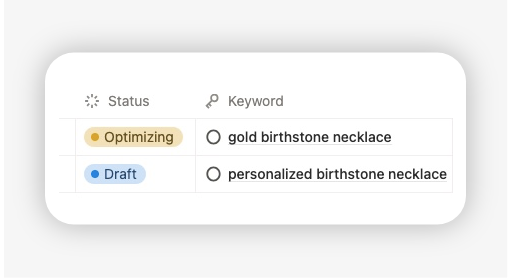
Each listing must have a visible status.
That makes the pipeline manageable and prevents drafts and active listings from blending together.
4. Review layer
Each listing must have a next action.
Examples:
- add photos
- revise title
- complete tags
- update description
- publish
- refresh listing
- retire listing
This is the layer that turns organization into execution.
If one listing has a status but no next action, it can still get stuck.
If one listing has a next action but no keyword, it can still become inconsistent.
The strength of the framework is that it covers all four layers together.
Using an Etsy listing template to centralize listing operations
At this stage, many sellers realize that the problem is not knowing what to do.
The problem is having no structured place to run the process.
That is where an Etsy listing template becomes useful.
What an Etsy listing template should include
A useful template should let you track:
- listing title
- linked product
- main keyword
- status
- pricing
- photos and video
- optimization notes
- performance signals
- next action
- review date
It should also make it easy to filter listings by operational state, not just store them in a static table.
If a template cannot help you see what needs attention, it is not solving the real problem.
Browse Notion Etsy Shop OS
Notion Etsy Shop OS includes this Etsy listing planner framework inside a much bigger system: keyword mapping, listing coverage, products, SEO workflows, inventory, orders, and shop planning — all connected in one workspace.

How a centralized listing database reduces manual tracking
A centralized system reduces scattered work.
Instead of managing listings across Etsy drafts, notes, spreadsheets, and memory, you can manage them in one place.
That creates several practical benefits:
- clearer publishing pipeline
- less duplicate work
- stronger consistency across listings
- better visibility into what is complete and incomplete
- easier ongoing optimization
This is exactly why many sellers move to a Notion-based operating system once the shop becomes more complex.
Instead of treating listings as isolated tasks, they manage them as part of a connected shop workflow.
How listing organization connects with keyword planning
Good listing organization eventually connects with a deeper question:
Are you just tracking listings, or are you planning coverage?
That is the next level.
Once your listings are organized, you can start seeing:
- which products already have listing coverage
- which keywords already have linked listings
- which listings are missing a clear keyword
- where your catalog still has gaps
In our own Etsy shop management framework, this is where the listing database connects naturally with the keyword system.
The listing side helps organize active and draft listings operationally.
The keyword side helps plan what each listing should target and where coverage is still missing.
That combination matters because a growing Etsy shop does not just need a list of listings. It needs a structure that connects products, listings, and keyword intent in one workflow.
If you want to apply this without building your own system from scratch, using a structured Etsy shop template can make that much easier. A connected setup can centralize listings, link them to products, track the main keyword for each one, and show which listings are active, incomplete, or due for optimization.
In practice, that gives sellers both the what and the how: a clear method for organizing listings, and a working system to run it.
How to keep Etsy listings organized as your shop expands
The bigger your shop gets, the more important maintenance becomes.
Listing organization is not a one-time cleanup. It is an ongoing discipline.
Weekly listing maintenance
A weekly check can be short, but it should be structured.
Review:
- new drafts created this week
- listings ready to publish
- active listings with obvious missing assets
- any listings waiting for pricing or description work
- listings with no next action
The goal is to keep the system moving.
Monthly optimization review
Once a month, review your active listing portfolio more critically.
Look for:
- listings with low engagement
- listings with weak conversion
- listings that may need stronger photos
- listings with outdated titles or tags
- listings missing a recent review
This helps you shift from reactive listing edits to a repeatable optimization cycle.
When to refresh, duplicate, or retire a listing
Not every listing deserves the same treatment.
Some should be refreshed.
Some may deserve a new angle.
Some should be retired.
A listing might need a refresh when:
- the photos are weak
- the first image is not competitive
- the title is unfocused
- the keyword target is unclear
- the listing is live but under-optimized
A listing might need to be retired when:
- the product is no longer relevant
- the item is discontinued
- the listing is redundant
- the angle is no longer useful in the catalog
This is another reason centralized organization matters. You can make those decisions intentionally instead of reacting at random.
FAQ
How to organize Etsy listings?
The best way to organize Etsy listings is to track them by status, linked product, and primary keyword. That gives you a clear workflow for drafting, publishing, optimizing, and reviewing listings over time. With the Notion Etsy Planner template, you can get it.
Should I use Etsy shop sections to organize listings?
Yes, but only for buyer-facing organization. Shop sections help customers browse your storefront, but they do not replace an internal listing management system.
What is the best way to manage Etsy listings as my shop grows?
Use a centralized listing workflow outside Etsy (such as a Notion template) that tracks each listing’s status, product connection, keyword target, assets, and next action. This is much more scalable than relying on Etsy drafts alone.
How do I avoid having multiple Etsy listings target the same keyword?
Assign one primary keyword to each listing and review your catalog regularly for overlap. This helps keep your listing structure clearer and reduces duplicate intent across your shop.
How to delete a shop section on Etsy
To delete a section from your Etsy shop, go to Shop Manager, select “Listings,” and click ‘Manage’ next to “Sections.” Click the pencil icon next to the section you want to delete, then select “Delete section.” The listings in that section will become unassigned, but they won’t be deleted.


